
You already know that AI can revise writing and brainstorm ideas, but there is a lot more it can do. Here is my top-10 list of AI’s most useful functions for busy academics. Works with ChatGPT, Bard, and Bing.
1. Turn notes and scribbles into organized text
Taking notes during a meeting or a seminar but don’t have time to write fluid sentences? Just upload your jumble of words into AI and get back a page of well-organized text. You can even take a photo of your hand-written notes and turn it into typed text.

Prompt example:
Turn my rough notes into organized and structured summary with full sentences. Use bullet points and/or lists if appropriate. Output my formatted notes only.
2. Turn messy numbers into neat and consistent tables
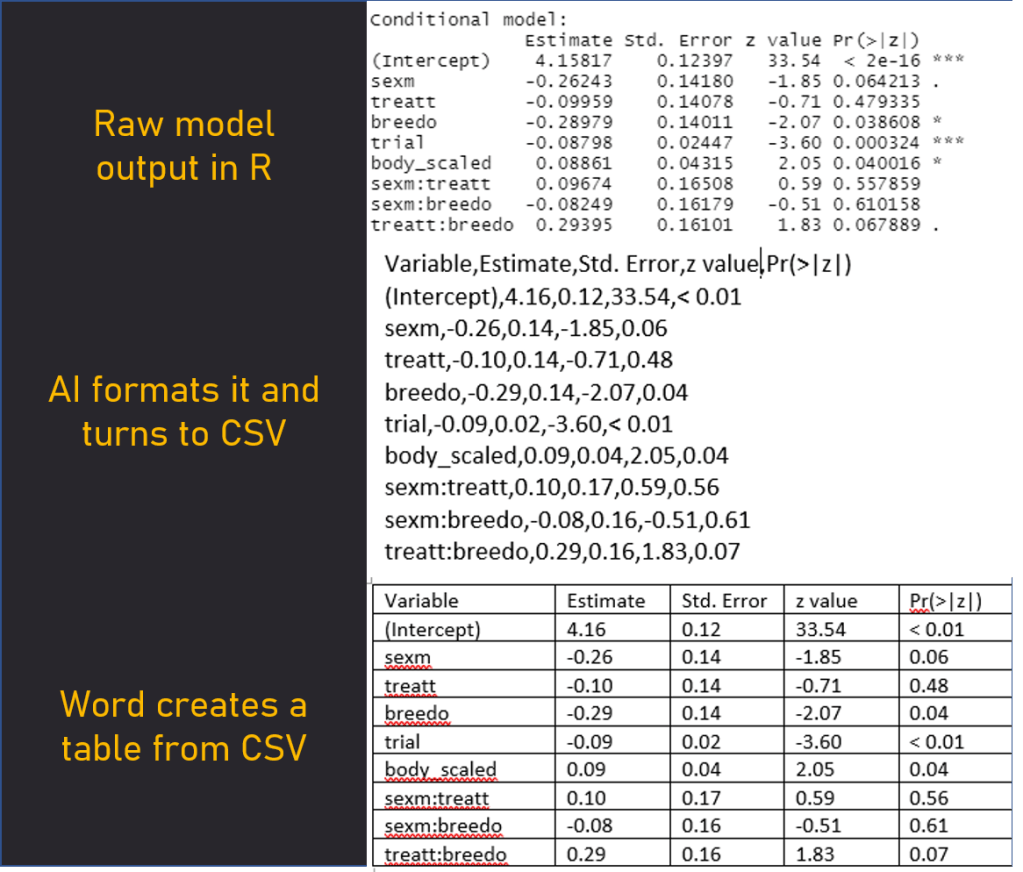
AI can easily go through texts and tables to change decimal point values, add/remove stars in significant values, and organize model outputs into list or tables. To create tables, ask AI to create a comma-separated list and then convert it to a table using Word/Excel.
Prompt and output example:
Change this table to a comma-separated format and change all values to 2 decimal points. If value is smaller than 0.01. display "< 0.01". Remove significance starts.
3. Meta-analysis tools
AI can ‘read’, summarize, compare and contrast multiple articles in under a minute. You can search and extract specific information, like sample sizes, conclusions, or citations. Simply attach multiple PDFs to your AI app and write a prompt. Astonishingly, AI can be used to filter medical research studies to fit meta-analysis criteria (see Cai et al. 2023, medRxiv). I have no doubt that AI will become a standard meta-analysis tool in the nearest future.
4. Generate images for presentations and posters
Get creative and generate images for your articles, presentations, and posters. You can make anything from background textures to abstract cartoons of your study models. Forget about copyright worries as long as you cite the AI generator (check license ifno). Keep in mind: AI is not ideal for scientifically accurate and detailed images. You won’t be able to depict accurate cell division, snail anatomy, or air dynamic models.
Here is a cover of my conference talk I made with DALLE 3.

AI image is on the left. The rest of the slide was made in PowerPoint.
Prompt used:
Illustration of an inbred guppy fish sitting in a rocking chair on a house deck in a poor rural country wearing a straw hat, sunbathing on a hot day.
5. Reformat citations
Reference managers are great tools designed for consistency and efficiency. The reality is that vigorous editing often messes up with the software and introduces mistakes and inconsistencies in references. Use AI to reformat your reference list, check for punctuation signs in citations, abbreviate or expand journal titles, or identify citations with missing information.
Prompt example:
Rewrite my citations in APA format. Keep formatting consistent. Make sure that all journal names use short/abbreviated format according to the standard rules. Capitalize each word (but articles) in the titles.
6. Create social media posts
Upload your article (or its abstract) to generate a tweet (aka X post), thread, or an Instagram post. Crafting the right prompt is crucial; generate multiple versions and tweak them as needed.
Prompt example:
Generate a tweeter post from the abstract and provide 5 different versions. Also suggest a few hashtags to use. 1. Formal, concise, and academic. 2. Concise, sharp, and impactful, with focus on significance of our findings. 3. Make the format more engaging, interesting, and appropriate for academic twitter. 4. Propose a creative and different way to tweet . Avoid pompous words, use relatively simply, sharp, logical language. Try to incorporate puns or play on words.
7. Format, annotate, and shorten your code
When preparing your code for publications, it is a good idea to format it nicely, ensuring consistent and logical structure, indenting, and annotations. This is easy to do with AI. You can also consider making your code more concise, but make sure it does not affect functionality. The rule for coding with AI is simple: you must understand how the generated code works if you want to use it.
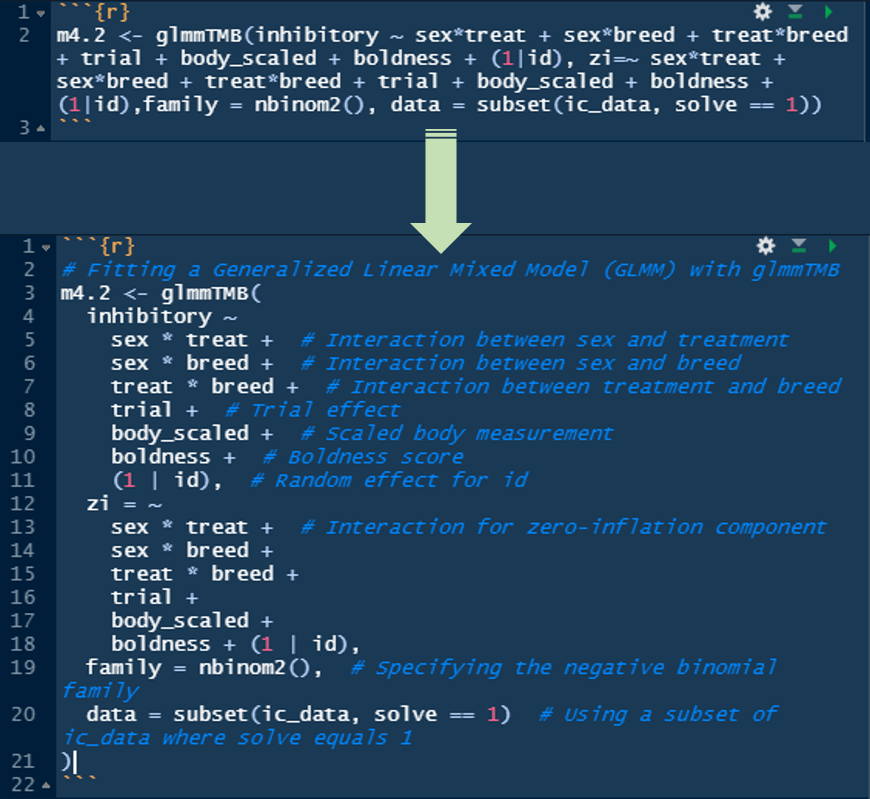
Prompt example:
Improve formatting of my RMarkdown code. Make sure the structure is logical, consistent, and clear. If needed, change indenting, add or edit comments, use Markdown formatting on text. Do not change the code functionality.
8. Format text via Markdown
Generating text with AI that maintains format, like text size or italic, can be tricky. The solution is Markdown, language for text formatting that uses a plain-text editor. For any above functions requiring specific formatting, request AI to output text in Markdown, applying formatting as needed.
9. Literature search
Searching for literature relevant to your field can be daunting and time consuming. As of December 2023, AI is not the best tool for a comprehensive literature search, but a few specialized websites work quite well, such as Scite, Consensus and Connected Papers. Chatbots like ChatGPT and Bard are also getting better at it, but the risk of fake references still exists. Ask AI to find relevant books and articles to your field, then upload reference lists from these articles into AI and ask it to find more relevant papers to your specific questions.
10. Efficient, ethical, and safe use of AI
Keep a few important points in mind when using any form of AI.
- Some organizations, journals, and schools mandate full disclosure of AI usage, while others ban it (in my opinion, global AI acceptance is only a matter of time).
- Do not enter sensitive or private information into AI, as whatever you enter may be saved to train the model.
- The boundary between using AI for cheating versus improvement remains blurred. Be mindful of this controversy. This is a discussion for another day.
- Save frequently used prompts for easy copying into your chatbot. For example, I made a browser extension that allows you to save predetermined text, quickly copy it to clipboard, and paste it into your chatbot. I challenge you to make such a tool yourself – AI will help!
 COGNI·IVAN